Why Documentation Matters
Good documentation helps everyone. It allows departments to show the work they perform, helps Internal Audit complete reviews efficiently, and reduces the need for follow-up questions. Clear, complete documentation also supports timely audit completion and demonstrates accountability.
Quick Reference Summary
Use this summary as a quick guide when preparing a response to an Internal Audit request. See the sections below for additional examples and guidance.
- Show the full story. Provide documentation that shows what happened from request or initiation through approval, processing, completion, and review when applicable.
- Match the documents to what was requested. Tie records to the specific transaction, sample, time period, account, employee, vendor, event, or process being reviewed.
- Include key details and system context. Make dates, names, amounts, transaction numbers, account codes, approvals, review evidence, system source, report parameters, status, and identifiers visible when applicable.
- Organize and focus the submission. Use clear file names, label files by request or sample number when applicable, group related records together, and avoid duplicate, unrelated, or unnecessary records.
- Address missing items. If something is unavailable, explain what is missing, why it is unavailable, and provide alternative support when available.
- Include relevant email communications. Include email threads or messages when they help document the request, approval, decision, change, clarification, or follow-up for the sampled item.
- Handle sensitive information appropriately. Submit sensitive or confidential information using the method requested by Internal Audit.
- Use the stand-alone test. The documentation should be clear enough that someone unfamiliar with the activity can understand what occurred without a verbal walkthrough.
Documentation Expectations During an Audit
What Is an Audit Trail?
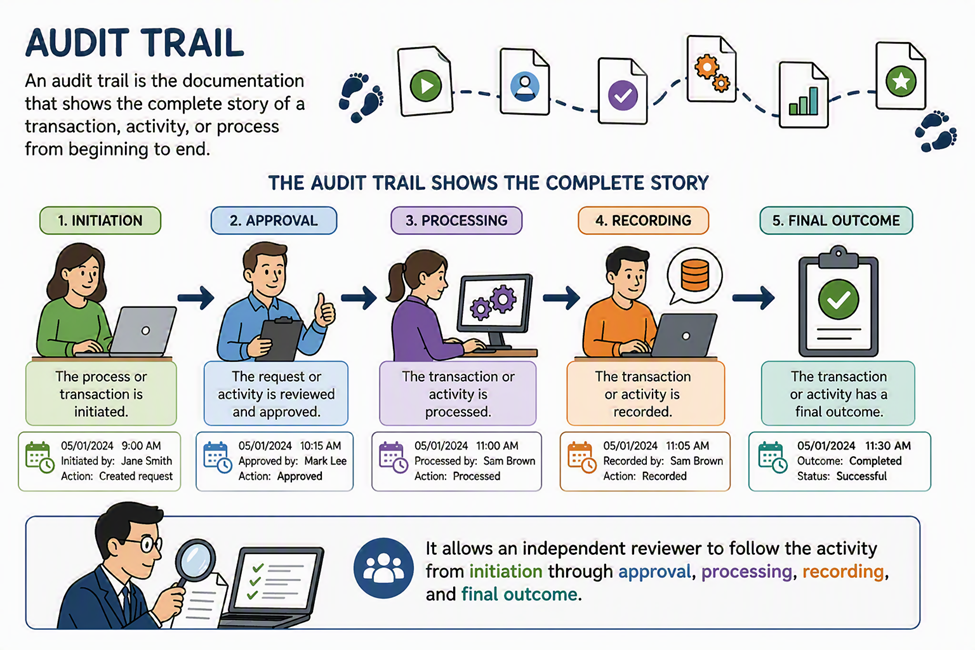
An audit trail is the documentation that shows the complete story of a transaction, activity, or process from beginning to end. It allows an independent reviewer to follow the activity from initiation through approval, processing, recording, and final outcome.
Initiation → Approval → Processing → Recording → Final Outcome
The goal is not to create extra work; it is to provide enough clear, organized evidence so someone unfamiliar with the activity can understand what happened without a verbal walkthrough.
A complete audit trail should allow someone who was not involved in the process to understand:
- What happened
- Who initiated, reviewed, and approved the activity
- When the activity occurred
- How it was processed
- Where it was recorded
- Whether required controls were followed
- What evidence supports each key step in the process
What Should Be Included?
When responding to an Internal Audit documentation request, provide records that are relevant, complete, tied to the item being reviewed, and clear enough to stand on their own.
How to Respond to an Audit Documentation Request
When you receive a request from Internal Audit, read it carefully, identify the transaction, time period, process, or control being reviewed, and gather records that show the activity from beginning to end. Organize the documentation in the order requested or in the order the activity occurred so the reviewer can follow the timeline and reduce follow-up questions.
- Include the documentation requested, not just a summary or explanation.
- Make key details easy to find, including dates, names, approvals, amounts, account codes, or other relevant information when applicable.
- If documentation comes from a system, include enough information to show the source, transaction, report, screen, and report parameters when applicable.
- If a step was handled outside the system, include emails, forms, logs, checklists, or other records that support what occurred.
- When relevant to the sampled item, include email threads or messages that support the request, approval, decision, change, clarification, or follow-up. Include email communication when it helps document the audit trail, not automatically for every transaction.
- If something requested is not available, explain what is missing and why, and provide any alternative support that helps verify the activity.
Examples of Strong Documentation
Documentation may include requests, approvals, contracts or agreements, invoices, payment records, system reports or screenshots, reconciliations, review evidence, checklists, logs, tracking records, and relevant email communication. Strong documentation does not need to be lengthy, but it should be clear, complete, and connected to the specific item being reviewed.
- For a purchase or payment: the request, approval, invoice, receiving confirmation if applicable, payment record, and account coding.
- For a reconciliation: the completed reconciliation, supporting reports, explanation of differences, preparer name, reviewer approval, and review date.
- For a system transaction: a system report or screenshot showing the transaction, date, amount, transaction ID or other identifying number, status, and user or approver when available.
- For a policy or procedure requirement: the applicable policy or procedure, the record showing the requirement was followed, and evidence of approval or review when required.
- For a review control: the item reviewed, the review checklist or sign-off, the reviewer’s name, the date of review, and any follow-up or correction made.
- For other types of transactions, such as facility rentals: the request or reservation, agreement or contract, approval, fee schedule or rate support, invoice or payment record, event details, and evidence of review or follow-up when applicable.
- For finance or accounting transactions: the journal entry, transfer, adjustment, or other transaction record; supporting calculation or source documentation; account coding; preparer and approver information; posting date; and evidence of review or reconciliation when applicable.
Organize and Focus the Submission
Well-organized, focused documentation helps Internal Audit review the information efficiently. Organize documents in the same order as the request or in the order the activity occurred and limit the submission to records needed to support the item being reviewed.
- Use clear file names that connect the document to the such as “Sample 3 – Invoice,” “Sample 3 – Approval,” or “May 2026 Reconciliation – Review Evidence.”
- Create separate files or folders for each request category, sample, reconciliation, policy, or procedure.
- Group related documents together so that the reviewer can follow each transaction or sample from beginning to end.
- When several documents support one item, a cover note or index may be needed, but is not always necessary. Consider including one when the connection between the files and the item being reviewed may not be clear.
- Highlight, bookmark, or otherwise identify key information when the document is lengthy, such as the approval date, transaction number, amount, or reviewer sign-off.
- Avoid sending duplicate, unrelated, or incomplete records that make it harder to identify the evidence requested.
- If submitting screenshots, include enough of the screen to show the system, transaction details, and relevant dates or identifiers.
- Include only the relevant portions of email communication needed to support the item being reviewed.
- When documentation includes sensitive or confidential information, talk with Internal Audit prior to submitting any documentation, and avoid including unrelated sensitive information that is not needed to support the request.
Common Audit Trail Gaps
Audit trail gaps can happen when documentation shows only part of the activity or does not clearly connect the evidence to the item being reviewed. Complete, well-labeled documentation helps the reviewer follow the activity from start to finish and understand what happened, who was involved, what was reviewed or approved, and where the final record is maintained.
To help avoid follow-up questions, watch for these common gaps:
- Providing only the result without showing how the activity started, who reviewed or approved it, or whether required controls were followed.
- Submitting screenshots, emails, or other records without enough context to identify the system, date, transaction, status, approval, or item being reviewed.
- Relying on explanations without supporting records or providing documents that are not clearly tied to the requested sample, transaction, time period, account, employee, vendor, event, or process.
- Providing more information than needed or not identifying missing pieces and available alternative support.
The table below provides practical examples of these gaps and stronger ways to document the audit trail.
| Common Gap | Why It Matters | Stronger Documentation |
| Only the contract, journal entry, final report, or spreadsheet is provided. | The reviewer cannot tell who prepared it, whether it was reviewed, or how the information was validated. | Provide the final document or report along with the records that show how it was prepared, reviewed, approved, or reconciled. This may include source data, supporting calculations, review notes, approval evidence, reconciliation support, workflow history, or other records that show how the information was verified. |
| A screenshot is provided without dates, names, transaction numbers, or system context. | The reviewer may not be able to confirm that the screenshot relates to the requested item or time period. | Provide screenshots that show identifying details, or include the related report, transaction number, employee or vendor name, date, and system source. |
| An approval email says “approved” but does not identify what was approved. | The reviewer cannot determine whether the approval relates to the specific transaction, amount, agreement, or action being reviewed. | Provide the approval email with the original request, attachment, amount, date, or other details that clearly connect the approval to the activity. |
| Only a written explanation is provided. | Explanations are helpful, but they do not replace evidence showing that the activity occurred. | Provide the explanation along with supporting records such as forms, system reports, logs, emails, checklists, or reconciliations. |
| Documentation shows that a task was completed but not who reviewed it. | If review is a required control, the reviewer needs evidence that the review actually occurred. | Provide signed or dated review checklists, workflow approval history, supervisory approval, or system evidence showing reviewer name and date. |
| Documents are provided but are not tied to the sample selected by Internal Audit. | The reviewer cannot verify whether the documentation supports the specific transaction, employee, vendor, account, or period requested. | Label files clearly and include identifiers such as sample number, transaction number, date, account code, employee name, vendor name, or event name. |
How to Handle Missing Documentation
If requested documentation is missing, unavailable, or incomplete, let Internal Audit know as soon as possible. Missing documentation does not always mean something was done incorrectly, but it does limit the ability to verify what occurred. Early communication allows Internal Audit to discuss what alternative support may be available. The most helpful response is to be transparent, explain the situation, and provide the best available support.
- Explain what documentation is missing and why it is not available.
- Provide alternative support, such as system records, reports, emails, logs, meeting notes, or later review documentation that supports the activity.
- Describe the process followed and support the explanation with records when available.
- Identify whether the documentation gap is isolated or part of a broader issue.
- If appropriate, explain what steps will be taken going forward to retain or create the needed documentation.
When to Contact Internal Audit
Contact Internal Audit early if you are unsure how to respond to a documentation request or if there may be issues with the records available. We can help clarify the request, discuss alternative support, or explain how to submit sensitive or confidential information. Please contact Internal Audit when:
- The request is unclear, or you are not sure which records are needed.
- Requested documentation is missing, incomplete, unavailable, or maintained by another department.
- You are unsure whether alternative support would be sufficient.
- The records include sensitive or confidential information, and you need guidance on how to submit them.
- The documentation request may require significant time to gather, and you need to discuss timing or prioritization.
Document Submission Checklist
Before submitting documentation to Internal Audit, use this checklist to confirm that your submission is complete, organized, and easy to follow.
- The documentation responds to the specific Internal Audit request and is tied to the correct sample, transaction, time period, account, employee, vendor, event, or process.
- The submission shows the activity from beginning to end, including request, approval, processing, completion, and review when applicable.
- Key details and system context are visible, such as dates, names, amounts, transaction numbers, account codes, status, approval information, system source, report parameters, or identifiers.
- Required reviews and approvals are included and clearly connected to the activity being reviewed.
- Files are clearly named, organized in the order of the request or activity, and key evidence is identified in long or complex documents.
- Missing documentation is explained, and alternative support is provided when available.
- Relevant email communication is included when it helps document the audit trail for the sampled item, such as the request, approval, decision, change, clarification, or follow-up.
- Internal Audit has been contacted prior to submitting any sensitive or confidential information.
- Duplicate, unrelated, or incomplete documents are excluded unless needed for context.
Quick Self-Check
Before submitting documentation, ask:
If someone unfamiliar with this transaction reviewed these documents, could they understand what occurred from start to finish, who was involved, what approvals or reviews were completed, and where the activity was recorded without additional explanation?
If the answer is yes, your documentation is likely clear, complete, and ready to submit. If you are unsure whether your documentation is sufficient, contact Internal Audit before submitting so we can help clarify the request.
Internal Audit Document Submission Checklist
**Generated by AI**